In this article
- Quick comparison
- 1. iptviva: the easiest option, nothing to install
- 2. IPTVnator: best player overall
- 3. MyIPTV Player: easiest on Windows 10 and 11
- 4. Kodi with PVR IPTV Simple Client: most powerful
- 5. IPTV Smarters Pro: same app everywhere
- 6. VLC: for testing, not daily viewing
- What about TiviMate on PC?
- Tips for smooth playback on a PC
- Our recommendation
- Frequently asked questions
If you’d rather not set up a player and a playlist at all, the simplest option is the iptviva app, which comes with its own channels, films and series and works on your TV, iPhone, iPad or laptop. The best IPTV player for Windows PC is IPTVnator: free, open source, with a real TV guide and support for M3U playlists and Xtream Codes logins. MyIPTV Player is the easiest pick from the Microsoft Store, and Kodi is the most powerful if you also want a full media center. All three also work well on large playlists.
Watching IPTV on a computer is different from a TV: you want windowed playback, keyboard shortcuts and an interface that works with a mouse. Here are the five players that do it best.
Quick comparison
| Player | Windows | Mac | TV guide | Best for | Cost |
|---|---|---|---|---|---|
| iptviva | Yes (browser) | Yes (browser) | Now and next | No install, no playlist | Subscription, free trial |
| IPTVnator | Yes | Yes | Yes | Best overall, free | Free, open source |
| MyIPTV Player | Yes (Microsoft Store) | No | Yes | Simple install on Windows 10/11 | Free with optional paid tier |
| Kodi + PVR IPTV Simple | Yes | Yes | Yes | Media center users | Free, open source |
| IPTV Smarters Pro | Yes | Yes | Yes | Same app as on your phone and TV | Free |
| VLC | Yes | Yes | No | Testing a playlist | Free, open source |
1. iptviva: the easiest option, nothing to install
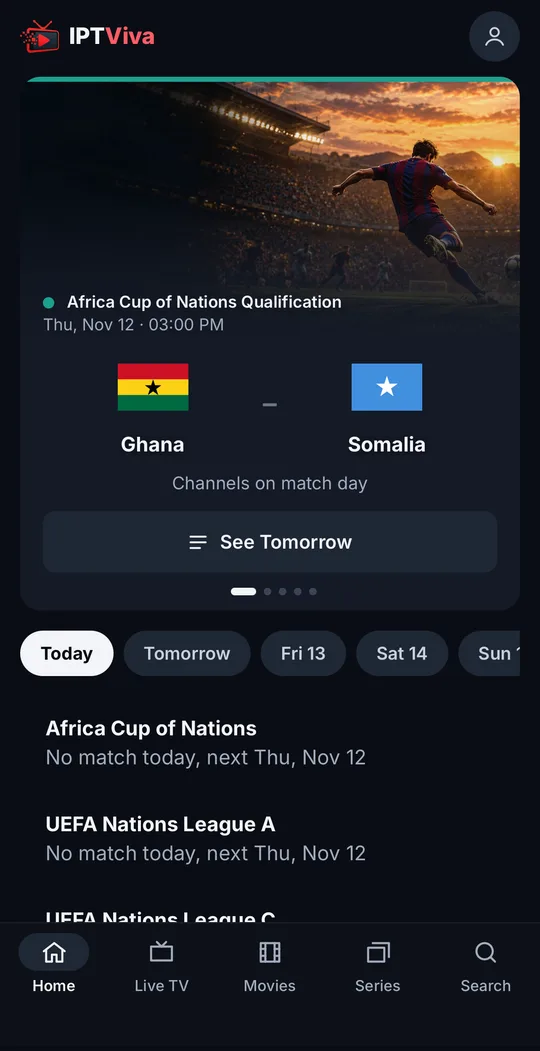
iptviva is the only app here that works out of the box. Instead of an empty player waiting for a playlist, it’s a complete TV app with its own channels, films and series: you install it, sign in with your email and password, and start watching.
What sets it apart from the players below:
- Today’s matches first. The Home screen opens on the day’s football matches, and each one links to a channel that’s working right now: the app tests the channels showing each match and only lists the ones that pass.
- Films and series like a streaming service, with posters in the style of Netflix rather than a long text list.
- One search for everything: channels, films and series in a single search box.
- One account on every screen: your TV (Fire TV, Android TV), iPhone and iPad, Android phones and tablets, and any laptop or computer through the browser (Windows or Mac).
Worth knowing: the guide shows what’s on now and next (about 24 hours ahead), there’s no recording or catch-up yet, and it plays its own catalogue only, so you can’t open your own M3U playlist in it. More about the iptviva app.
2. IPTVnator: best player overall
IPTVnator is a modern, open-source IPTV player for Windows, macOS and Linux. It loads M3U playlists and Xtream Codes logins, shows a TV guide, lets you favorite channels and handles several playlists. It’s actively developed and free. For most people on a PC, this is the one to try first.
3. MyIPTV Player: easiest on Windows 10 and 11
Available from the Microsoft Store, MyIPTV Player is simple to set up and stable, with a guide and channel favorites. The interface is basic, and some extras sit behind an optional paid tier, but it’s a solid, no-fuss choice.
4. Kodi with PVR IPTV Simple Client: most powerful
If you already use Kodi for your movie library, add the official PVR IPTV Simple Client add-on and you get live TV with a guide in the same interface. It’s free and extremely flexible, but takes the longest to set up, and the guide is slower with very large playlists.
5. IPTV Smarters Pro: same app everywhere
Smarters has Windows and Mac versions, so you can use the same interface on your computer, phone and TV. Its movies-and-series layout is pleasant on a big monitor. The guide is slower than dedicated players. Compare it with TiviMate in TiviMate vs IPTV Smarters.
6. VLC: for testing, not daily viewing
VLC opens almost any M3U playlist instantly, which makes it perfect for checking that a list works. But there’s no real guide or channel management, so it isn’t comfortable for everyday use.
What about TiviMate on PC?
TiviMate has no Windows or Mac version. You can run it inside an Android emulator, but it’s heavy, the interface is designed for a TV remote, and Premium activation still needs an Android phone. A native PC player is a better experience. If you like TiviMate’s style, see our TiviMate alternatives.
Tips for smooth playback on a PC
- Use Ethernet if the PC is near the router; laptops on busy Wi-Fi buffer far more.
- Turn on hardware acceleration in the player settings to keep CPU use low in 4K.
- Close heavy browser tabs and background downloads while watching live TV.
Our recommendation
- If you don’t have a playlist or don’t want to set one up: iptviva, the simplest option.
- Most people: IPTVnator.
- Want a Microsoft Store app: MyIPTV Player.
- Already use Kodi: PVR IPTV Simple Client.
- Want the same app on every device: IPTV Smarters Pro.
- Just testing a playlist: VLC.
Frequently asked questions
What is the best IPTV player for Windows?
For most people, IPTVnator: it's free, open source, supports M3U and Xtream Codes, and has a proper TV guide. MyIPTV Player is a good Microsoft Store option, and Kodi is best if you also want a full media center.
Can I use TiviMate on Windows?
Not natively. TiviMate is built for Android TV, so on a PC it only runs inside an Android emulator, which is clunky and uses a lot of resources. A native Windows player is a better experience.
Is VLC good for IPTV?
VLC is great for quickly checking that an M3U playlist works, but it has no real TV guide or channel management, so it isn't practical for everyday viewing.
What is the best IPTV player for Mac?
IPTVnator and Kodi both run on macOS. IPTV Smarters also has a Mac version. On Mac, IPTVnator is the most polished free option.