In this article
If you’d rather not set up a player and a playlist at all, the simplest option is the iptviva app, which comes with its own channels, films and series and works on your TV, iPhone, iPad or laptop. The best IPTV player for Android TV, Google TV and Fire Stick is TiviMate if you want the closest thing to a cable box. OTT Navigator is the best option that costs nothing if you don’t mind a more technical interface, and IPTV Smarters Pro is the easy pick if you also want the same app on your phone or computer.
Before choosing an app, check which device you have, or you might end up hunting for an app your Fire TV can’t run.
First: does your Fire TV run Fire OS or Vega OS?
Amazon now ships two systems on its Fire TV devices:
- Fire OS (Android-based): Fire TV Stick HD, Fire TV Stick 4K, Fire TV Stick 4K Max and most older Fire TVs. Every player in this guide runs on it.
- Vega OS (Amazon’s own system): the Fire TV Stick 4K Select, released in late 2025, and future models that adopt it. It doesn’t run Android apps, so TiviMate, OTT Navigator and Kodi won’t work.
Android TV and Google TV devices (Google TV Streamer, Onn 4K Pro, Nvidia Shield, TVs with Google TV) have no such limitation.
Quick comparison
| Player | Best for | TV guide | Recording | In the Amazon Appstore? | Cost |
|---|---|---|---|---|---|
| iptviva | Skipping the player-and-playlist setup | Now and next (~24 h) | No | No (installed with Downloader) | Subscription, free trial |
| TiviMate | Cable-box experience in the living room | Excellent | Yes (Premium) | No | Free tier + Premium |
| OTT Navigator | Customizing everything | Very good | Yes | Varies by region | Free + paid options |
| IPTV Smarters Pro | One app on TV, phone and PC | Fine | Depends on version | Varies by region | Free |
| Televizo | Clean, simple interface | Good | Depends on version | No | Free + Premium |
| iMPlayer | Several synced devices | Good | Depends on version | Varies by region | Paid after trial |
| Kodi + PVR IPTV Simple | People already using Kodi | Good | Yes (with a backend) | Yes | Free, open source |
App store availability changes often and depends on your country. If an app isn’t listed, only download it from the developer’s official website.
What we looked at
For an IPTV player on a TV, these are the criteria that matter:
- Guide speed with large playlists. With hundreds of channels and several days of listings, some apps crawl on a Fire TV Stick.
- Hardware 4K and HEVC decoding. This decides whether 4K streams play smoothly or stutter.
- Remote-control navigation. An app designed for touchscreens is painful on a TV.
- TV features: catch-up, recording, favorites and multi-view.
- Origin and updates. An abandoned or modified app is a security risk for your home network.
The best IPTV players for Android TV and Fire Stick
1. iptviva: the easiest option, no player or playlist to set up
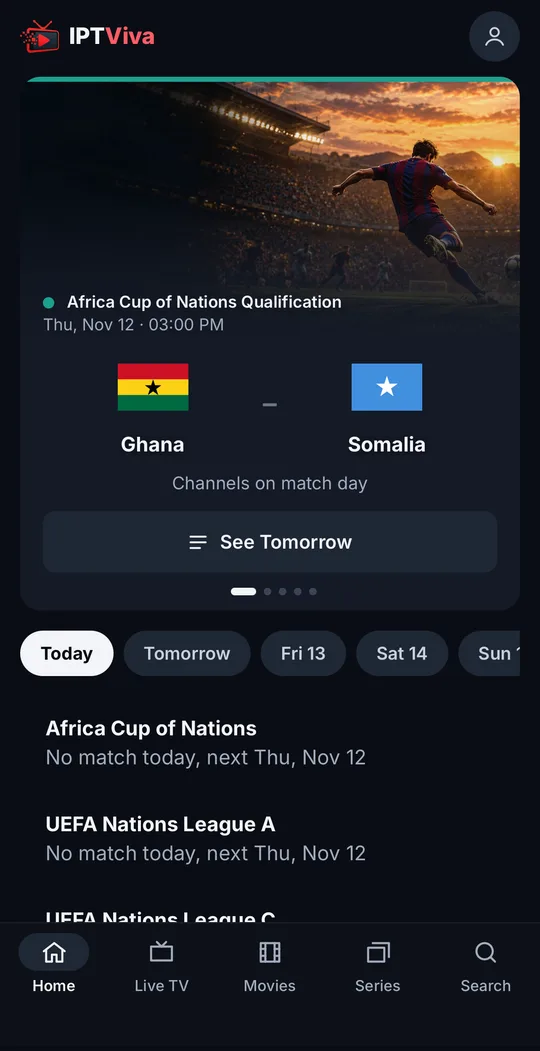
iptviva is the only app here that works out of the box. Instead of an empty player waiting for a playlist, it’s a complete TV app with its own channels, films and series: you install it, sign in with your email and password, and start watching.
What sets it apart from the players below:
- Today’s matches first. The Home screen opens on the day’s football matches, and each one links to a channel that’s working right now: the app tests the channels showing each match and only lists the ones that pass.
- Films and series like a streaming service, with posters in the style of Netflix rather than a long text list.
- One search for everything: channels, films and series in a single search box.
- Quick to set up. On a Fire TV Stick (Fire OS) or Android TV it installs in a few minutes with the Downloader app (code 7979931), and that’s it: no playlist URL, no EPG link, no settings to tweak.
- One account on every screen: your TV (Fire TV, Android TV), iPhone and iPad, Android phones and tablets, and any laptop or computer through the browser (Windows or Mac).
Worth knowing: the guide shows what’s on now and next (about 24 hours ahead) rather than a multi-day grid, there’s no recording or catch-up yet, there’s no Vega OS or Apple TV app, and it plays its own catalogue only, so you can’t add another provider’s playlist. More about the iptviva app.
2. TiviMate: best player overall
Our pick for most people. Its grid guide is the fastest and most comfortable we’ve used, channel switching is instant, and Premium adds recording, catch-up, multiple playlists and multi-view. The catch: Android TV and Fire OS only, and not in the Amazon Appstore. Full review: Is TiviMate good? Free vs Premium.
3. OTT Navigator: the most complete option without paying
OTT Navigator does nearly everything TiviMate does, and more in places: multiple playlists, a configurable guide, catch-up, recording and deep customization. The trade-off is less intuitive menus, so plan to spend some time setting it up.
4. IPTV Smarters Pro: easiest and cross-platform
Smarters stands out for being almost everywhere: Fire TV, Android, iPhone, Windows and Mac. Its poster-style interface is pleasant for movies and series, though its guide is slower than TiviMate’s. Head-to-head: TiviMate vs IPTV Smarters.
5. Televizo: clean and simple
Televizo has a modern, tidy interface, loads quickly and supports M3U playlists and Xtream Codes logins. A good middle ground for people who find TiviMate too “cable box” and OTT Navigator too complex. Some advanced features require Premium.
6. iMPlayer: for multiple screens
iMPlayer is designed for people who watch on several screens and want the same setup everywhere, with synced playlists and favorites. It’s polished, but paid after the trial, so it makes most sense if you’ll actually use the syncing.
7. Kodi with PVR IPTV Simple Client
Kodi isn’t an IPTV player as such but a media center. With the official PVR IPTV Simple Client add-on it can play M3U playlists with a guide. It’s free, open source and powerful if you already use it for your local library, but setup takes longer and the guide is slower than TiviMate’s with large playlists.
What about VLC? It’s handy to quickly test whether a playlist works, but it has no TV guide and isn’t meant for everyday TV viewing.
Your device matters too
- Fire TV Stick 4K Max (Fire OS): Amazon’s best option for IPTV, with 2 GB of RAM, 16 GB of storage and Wi-Fi 6E.
- Fire TV Stick 4K (Fire OS): enough for most people.
- Fire TV Stick HD: fine with small playlists, but the guide struggles with limited memory.
- Google TV Streamer or Onn 4K Pro: full Google TV, compatible with every app here. The Streamer adds built-in Ethernet.
- Nvidia Shield TV: the most powerful option, for people who want the best.
Whatever the device, your connection matters more than the app. A Fire Stick behind the TV, far from the router on busy Wi-Fi, will buffer with any player. An Ethernet adapter or better router placement usually fixes more than switching apps.
Our recommendation
- If you don’t have a playlist or don’t want to set one up: iptviva, the simplest option.
- For most people: TiviMate on a Fire TV Stick 4K Max or a Google TV device.
- Without paying for an app: OTT Navigator.
- If you also watch on a phone or computer: IPTV Smarters Pro.
- If you already use Kodi: PVR IPTV Simple Client, and try TiviMate to compare.
And remember: none of these apps include channels. Use them with providers that hold the rights to what they stream.
Frequently asked questions
Is there a good IPTV player that costs nothing?
Yes. OTT Navigator and Televizo offer very complete features without paying, and IPTV Smarters Pro is free on most platforms. Kodi with the PVR IPTV Simple Client add-on is free and open source, though more work to set up.
Why isn't TiviMate in the Amazon Appstore?
TiviMate is distributed through Google Play but not the Amazon Appstore. On Fire OS devices it has to be installed from outside the store. Always use the developer's official source and avoid modified versions.
Which Fire TV Stick is best for IPTV?
The Fire TV Stick 4K Max is the best choice thanks to its processor and Wi-Fi 6E, followed by the Fire TV Stick 4K. Avoid Vega OS models like the Fire TV Stick 4K Select if you want Android players such as TiviMate or OTT Navigator.
What is an IPTV player?
An app that plays TV streams delivered over the internet (M3U playlists, Xtream Codes logins or portals) with a TV guide. It does not include any channels: the content comes from your provider.